From telegram tell your OpenClaw to order from any website - it creates a secure credit card on demand from crypto and pays for the order
The payment layer for your AI agent. Plug it in — ClawPay pays anywhere on the web, autonomously, without a card on file and without you touching anything.
Your agent can browse, decide, and act - but it can't pay. The only native option is x402, which requires the merchant to explicitly support it. That's a tiny fraction of the internet.
Giving your agent a real debit card is worse: it has persistent access to your funds, and one bad checkout later your card number is compromised.
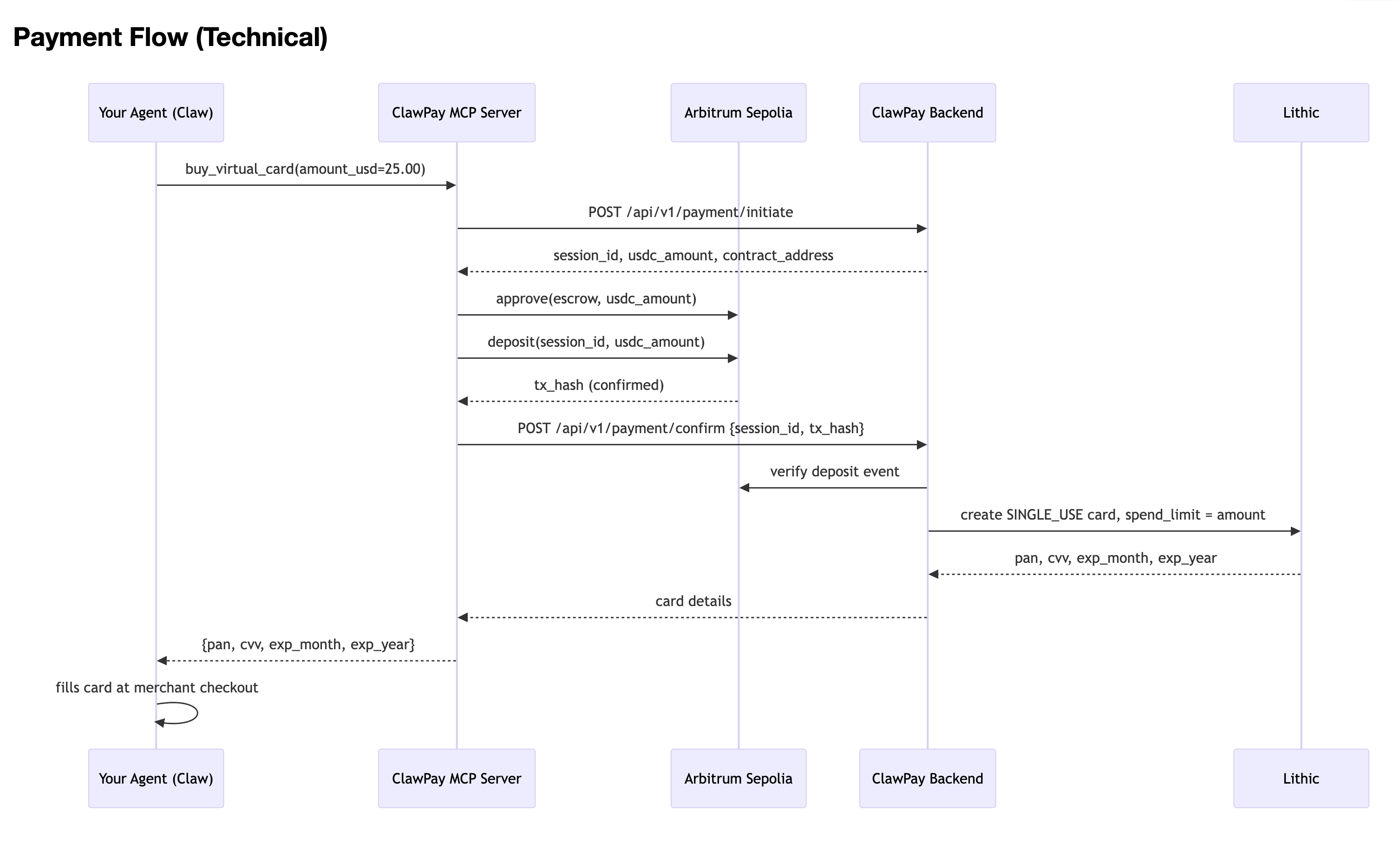
ClawPay sits between your agent and the web's payment infrastructure:
Your agent calls buy_virtual_card() with an amount
USDC is deposited into an on-chain escrow - nothing moves without your wallet signature
A single-use virtual card is issued with an exact spend limit
Your agent uses that card at any website checkout, just like a human would
Card is dead after one charge. Unused balance refunded as USDC.
No merchant opt-in. No card on file. No human in the loop.
x402 requires the website to support it. ClawPay works on every site that accepts Visa/Mastercard.
On-demand, per-transaction cards - a fresh card with an exact spend limit, every time. Your agent never holds a reusable number.
Spend-capped - even if the card leaks, it can only be charged once for that exact amount, then it's dead.
You hold the crypto - USDC stays in your wallet until you sign. ClawPay never custodies your funds.
No conversion - you don't sell crypto for fiat. Escrow holds USDC, card issuance is triggered on-chain confirmation.
Your Agent (Claw / Claude / any MCP agent)
      │
      │  buy_virtual_card(amount_usd=25.00)
      ▼
ClawPay MCP Server
      │  signs + submits USDC escrow tx
      ▼
Arbitrum Sepolia Escrow Contract
      │  on-chain confirmation
      ▼
ClawPay Backend
      │  verifies tx, issues card
      ▼
Lithic Single-Use Virtual Card
  (exact spend limit, one-time use, dead after charge)
      │
      ▼
Agent checks out on any website - no human needed
┌──────────────────────────────────────┐
│     Your Agent (Claw, Claude, etc.)  │
│   "buy X from website Y for $25"     │
└───────────────┬──────────────────────┘
                │ MCP: buy_virtual_card()
                ▼
┌──────────────────────────────────────┐
│         ClawPay MCP Server           │
│  Signs & submits USDC escrow tx      │
└───────────────┬──────────────────────┘
                │ POST /api/v1/payment/confirm
                ▼
┌──────────────────────────────────────┐
│         ClawPay Backend (FastAPI)    │
│  Verifies on-chain deposit           │
│  Issues Lithic single-use card       │
└───────────────┬──────────────────────┘
                │ {pan, cvv, expiry}
                ▼
┌──────────────────────────────────────┐
│   Agent fills card at any checkout   │
│   Works on any website, no opt-in    │
└──────────────────────────────────────┘
x402 | ClawPay | |
|---|---|---|
Merchant opt-in required | Yes | No |
Card exposure risk | N/A | None - single-use, spend-capped |
Crypto stays as crypto | Yes | Yes - USDC, no conversion |
Agent autonomy | Full | Full |
Coverage | ~handful of sites | Every site that accepts cards |
Layer | Technology |
|---|---|
Blockchain | Arbitrum Sepolia · USDC (ERC-20) |
Smart contract | Solidity escrow ( |
Card issuance | Lithic virtual cards (SINGLE_USE) |
Backend | Python / FastAPI |
Agent interface | MCP (FastMCP) |
Dashboard | React + Vite |
Contract | Address |
|---|---|
MockUSDC |
|
ClawPayEscrow |
|
The MCP server gives your agent two tools:
buy_virtual_card(amount_usd, merchant_name?) - deposits USDC, returns a single-use card
check_wallet_balance() - returns the agent wallet's USDC and ETH balances
Add to your Claude Desktop config (~/.claude/claude_desktop_config.json):
{
  "mcpServers": {
    "clawpay": {
      "command": "python",
      "args": ["/path/to/clawpay/mcp/server.py"],
      "env": {
        "AGENT_PRIVATE_KEY": "0x...",
        "CLAWPAY_API_URL": "https://clawpay-production.up.railway.app",
        "CLAWPAY_API_KEY": "sk_clawpay_..."
      }
    }
  }
}
Your agent now handles payments autonomously:
"Buy me a Cadbury Dairy Milk from ChocoBazaar"

# Claw calls ClawPay - no human steps:
#  ◆  deposits USDC into escrow on-chain
#  ◆  receives a single-use virtual card
#  ◆  checks out on the merchant site
#  ✓  card is dead after one charge
Plug ClawPay into OpenClaw so your agent can pay autonomously without any additional setup.
OpenClaw installed and running (openclaw plugins list works)
A wallet funded with ETH (gas) and USDC on Arbitrum Sepolia — get ETH from the faucet, then mint MockUSDC by calling mint(yourWallet, amount) on the MockUSDC contract
A ClawPay API key (sk_clawpay_...)
mkdir -p ~/.openclaw/extensions/clawpay
cd ~/.openclaw/extensions/clawpay
package.json{
"name": "clawpay",
"version": "1.0.0",
"openclaw": {
"extensions": ["./index.ts"]
},
"dependencies": {
"ethers": "^6.0.0"
}
}
openclaw.plugin.json{
"id": "clawpay",
"name": "ClawPay",
"description": "Buy anything online — deposits USDC into escrow on Arbitrum Sepolia, returns a single-use virtual card.",
"version": "1.0.0",
"openclaw": {
"extensions": ["./index.ts"]
},
"configSchema": {
"type": "object",
"additionalProperties": false,
"properties": {
"privateKey": { "type": "string" },
"apiKey": { "type": "string" },
"usdcContract": { "type": "string" }
},
"required": ["privateKey", "apiKey"]
},
"uiHints": {
"privateKey": { "label": "Wallet Private Key", "sensitive": true },
"apiKey": { "label": "ClawPay API Key", "sensitive": true },
"usdcContract": { "label": "USDC Contract Address (optional override)" }
}
}
index.tsimport { ethers } from "ethers";
const ARB_SEPOLIA_RPC = "https://arbitrum-sepolia-testnet.api.pocket.network";
const CLAWPAY_API_URL = "https://clawpay-production.up.railway.app";
const ESCROW_ABI = [
{
inputs: [
{ internalType: "string", name: "sessionId", type: "string" },
{ internalType: "uint256", name: "amount", type: "uint256" },
],
name: "deposit",
outputs: [],
stateMutability: "nonpayable",
type: "function",
},
];
const ERC20_ABI = [
{
inputs: [
{ internalType: "address", name: "spender", type: "address" },
{ internalType: "uint256", name: "amount", type: "uint256" },
],
name: "approve",
outputs: [{ internalType: "bool", name: "", type: "bool" }],
stateMutability: "nonpayable",
type: "function",
},
{
inputs: [{ internalType: "address", name: "account", type: "address" }],
name: "balanceOf",
outputs: [{ internalType: "uint256", name: "", type: "uint256" }],
stateMutability: "view",
type: "function",
},
];
export default function (api: any) {
const cfg = api.config?.plugins?.entries?.clawpay?.config ?? {};
const rawKey: string = cfg.privateKey ?? "";
const apiKey: string = cfg.apiKey ?? "";
const privateKey = rawKey.startsWith("0x") ? rawKey : `0x${rawKey}`;
function wallet() {
const provider = new ethers.JsonRpcProvider(ARB_SEPOLIA_RPC);
return new ethers.Wallet(privateKey, provider);
}
// ── buy_virtual_card ───────────────────────────────────────────────
api.registerTool(
{
name: "buy_virtual_card",
description:
"Use this whenever the user wants to buy something online. " +
"Deposits USDC into escrow on Arbitrum Sepolia, then returns a single-use " +
"virtual Visa/Mastercard to use at checkout. Card is dead after one charge.",
parameters: {
type: "object",
properties: {
amount_usd: {
type: "number",
description: "Exact amount in USD to put on the card (e.g. 25.00)",
},
merchant_name: {
type: "string",
description: "Name of the merchant or website (optional, for labelling)",
},
},
required: ["amount_usd"],
},
async execute(_id: string, params: { amount_usd: number; merchant_name?: string }) {
const w = wallet();
// 1. Initiate session
const initRes = await fetch(`${CLAWPAY_API_URL}/api/v1/payment/initiate`, {
method: "POST",
headers: { "Content-Type": "application/json", "X-API-Key": apiKey },
body: JSON.stringify({
amount_usd: params.amount_usd,
user_wallet_address: w.address,
merchant_name: params.merchant_name,
}),
});
if (!initRes.ok) {
const body = await initRes.text();
return { content: [{ type: "text", text: `ClawPay initiate error: ${body}` }] };
}
const session = await initRes.json();
const { session_id, contract_address, usdc_contract, usdc_amount } = session;
const amount = BigInt(usdc_amount);
// 2. Approve USDC spend
const usdc = new ethers.Contract(usdc_contract, ERC20_ABI, w);
const approveTx = await usdc.approve(contract_address, amount);
await approveTx.wait();
// 3. Deposit into escrow
const escrow = new ethers.Contract(contract_address, ESCROW_ABI, w);
const depositTx = await escrow.deposit(session_id, amount);
const receipt = await depositTx.wait();
// 4. Confirm → get card
const confirmRes = await fetch(`${CLAWPAY_API_URL}/api/v1/payment/confirm`, {
method: "POST",
headers: { "Content-Type": "application/json", "X-API-Key": apiKey },
body: JSON.stringify({
session_id,
tx_hash: receipt.hash,
user_wallet_address: w.address,
}),
});
if (!confirmRes.ok) {
const body = await confirmRes.text();
return { content: [{ type: "text", text: `ClawPay confirm error: ${body}` }] };
}
const result = await confirmRes.json();
const card = result.card ?? result;
return {
content: [{
type: "text",
text: JSON.stringify({
pan: card.pan,
cvv: card.cvv,
exp_month: card.exp_month,
exp_year: card.exp_year,
spend_limit_usd: params.amount_usd,
merchant: params.merchant_name ?? "(any)",
note: "Single-use card — dead after first charge.",
}, null, 2),
}],
};
},
},
{ optional: true }
);
// ── check_wallet_balance ───────────────────────────────────────────
api.registerTool(
{
name: "check_wallet_balance",
description: "Check the agent wallet's USDC and ETH balances on Arbitrum Sepolia.",
parameters: { type: "object", properties: {} },
async execute(_id: string, _params: object) {
const provider = new ethers.JsonRpcProvider(ARB_SEPOLIA_RPC);
const w = wallet();
const usdcAddr = cfg.usdcContract ?? "0xFCABF780284B0d5997914C5b1ab7Ac34F0F01eaE";
const usdc = new ethers.Contract(usdcAddr, ERC20_ABI, provider);
const [usdcBal, ethBal] = await Promise.all([
usdc.balanceOf(w.address),
provider.getBalance(w.address),
]);
return {
content: [{
type: "text",
text: JSON.stringify({
wallet: w.address,
usdc: `${(Number(usdcBal) / 1e6).toFixed(2)} USDC`,
eth: `${ethers.formatEther(ethBal)} ETH`,
}, null, 2),
}],
};
},
},
{ optional: true }
);
}
cd ~/.openclaw/extensions/clawpay
npm install
openclaw.jsonEdit ~/.openclaw/openclaw.json in two places:
a) Allow the tools (inside the existing "tools" block):
"tools": {
  "web": { "...": "..." },
  "allow": ["buy_virtual_card", "check_wallet_balance"]
}
b) Register the plugin (inside the existing "plugins"."entries" block):
"plugins": {
  "entries": {
    "clawpay": {
      "enabled": true,
      "config": {
        "privateKey": "0x<your-wallet-private-key>",
        "apiKey": "sk_clawpay_..."
      }
    }
  }
}
openclaw plugins list            # clawpay should show "loaded"
openclaw plugins info clawpay    # should show Tools: buy_virtual_card, check_wallet_balance
Your agent can now pay on any website the moment you say "buy X for $Y".
cd backend
python3 -m venv venv
source venv/bin/activate
pip install -r requirements.txt
python3 -m uvicorn src.main:app --reload --port 8000
Set in backend/.env:
LITHIC_API_KEY=...
ARB_ESCROW_CONTRACT=0x9ee0141d3FD09E4C15D183bD5017ef86e37b4254
USDC_CONTRACT=0xFCABF780284B0d5997914C5b1ab7Ac34F0F01eaE
ARB_PLATFORM_PRIVATE_KEY=0x...
cd mcp
pip install -r requirements.txt
cp .env.example .env   # fill AGENT_PRIVATE_KEY + CLAWPAY_API_KEY
python server.py
cd dashboard && npm install && npm run dev
Runs at http://localhost:3001 - manual MetaMask flow for testing without an agent.
backend/      FastAPI server - payment sessions, card issuance
contracts/    Solidity escrow (ClawPayEscrow.sol) on Arbitrum Sepolia
dashboard/    React UI - manual payment + card display
extension/    Browser extension - "Pay with ClawPay" button
mcp/          MCP server - agent payment tools
Backend API: https://clawpay-production.up.railway.app
Arbitrum Sepolia - get free ETH from the Arbitrum Sepolia faucet
Lithic sandbox - no real money involved
Cards are SINGLE_USE and closed after first charge
5% buffer on every card spend limit to cover taxes/fees; unused amount refunded as USDC
<p>Made the utility, deployed the contracts to arbitrum sepolia and integrated into the Agent which now can visit and pay on any website with our on-demand card without even having to worry about crypto conversions.</p>
<p>NA</p>

